AirGrabber: Virtual Keyboard using a Miniature Camera and a Tilt Sensor |
| 1. Abstruct |
|
The recent developments of computer hardware have stimulated a reduction in the size and weight of personal computers and their peripheral units. While Wearable Computers have been put to practical use, user interfaces are also required for portability in stead of carrying a conventional keyboard to type characters. Some devices have been proposed and provided for this demand. However, they are hard to use because of their restrictions for functionalities and circumstances to use or extremely special operational method. This paper presents AirGrabber a virtual keyboard suitable for Wearable Computers, which can enter characters by moving fingers like typing an existing keyboard in the air. And our experimental results show the effective performance in terms of actual typing situations. AirGrabber detects key strokes and selected keys by monitoring the motions of the fingers and hand by a miniature camera and a tilt sensor equipped on the user's wrist. Therefore, this system is easy to carry and enables the user to enter characters intuitively. |
| 2. AirGrabber |
| 2.1 Character input by virtual typing |
|
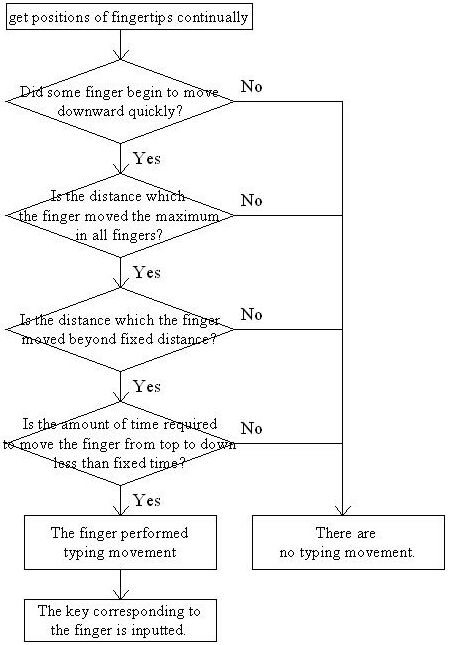
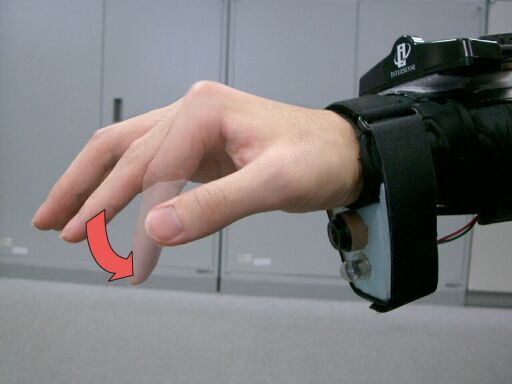
Character input interfaces for Wearable Computers should restrict the body as less as possible not to interrupt other work other than a character input operation. In order to realize character input by typing movement in the air without a physical keyboard, virtual keyboard system must recognize what key is chosen and typed. So this system divides these recongitions into following two distinct process. i. What keys are available to type. ii. Was the key typed or not typed. First, the candidates of the keys which can be typed change by where the hand exists on the keyboard. Therefore it can be referred to as matching a motion of an actual hand with position change of the hand on a virtual keyboard to recognize the above-mentioned i. Next, above-mentioned ii. is recognizemd by sensing movements of fingertips. This sensing should be executed without restraining the body as much as possible.
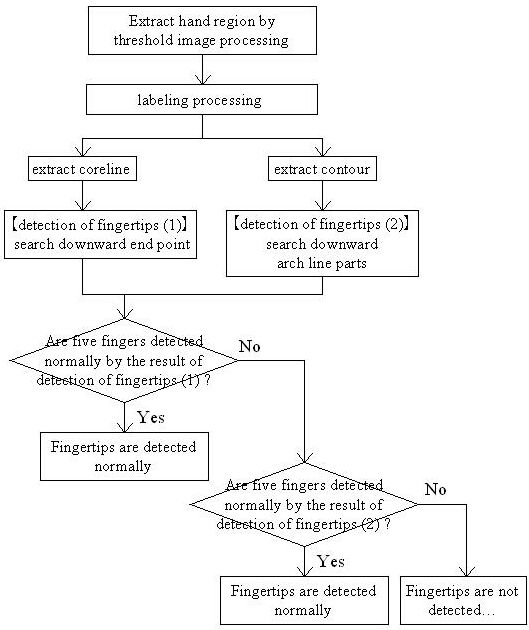
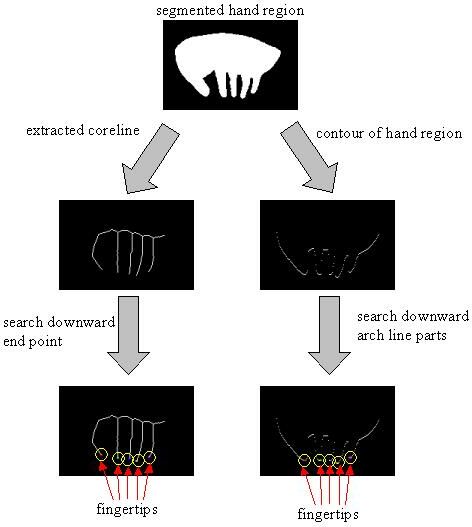
In order to make the minimum composition the equipments needed for distinction processing of above-mentioned i. and ii., the technique proposed by this research makes use of a miniature camera and a tilt sensor. These equipments are had on a wrist. According to the output of the tilt sensor, the positional relationship between a hand and a virtual keyboard is matched, and motions of the fingertips are constantly caught from the images taken by the miniature camera. This composition enables us to input keys by moving hand and fingers like typing an existing keyboard in the air. Additionally, this composition also enables us to shift to other works other than a key input operation easily because equipments are collected around only a wrist. |
| 2.2 Recognition of the keys which can be typed |
|
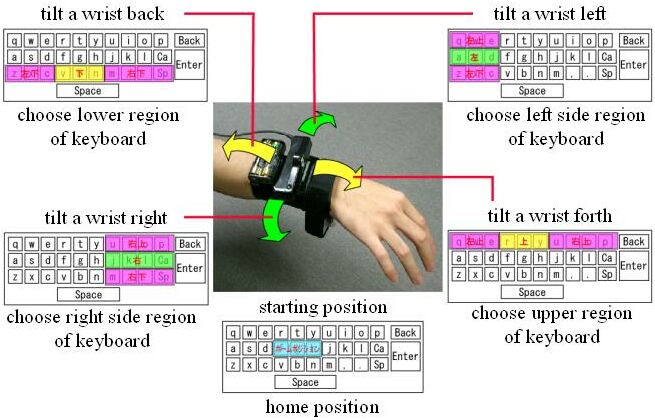
The tilt sensor of three axes recognizes tilt by front and rear, right and left of an arm. The degree of the tilt is considered as an amount of movements of the hand from a home position to choose the keys which can be typed. Concretely speaking, start with an assumption that a home position is made into the center of a virtual keyboard. If the wrist is leaned forward or backward, the above or bottom region of the keyboard will be chosen, and if the wrist is leaned to right or left, the right side or left side region of the keyboard will be chosen.
|
| 2.3 Recognition of typing movement |
| 3. Prototype system of AirGrabber |
|
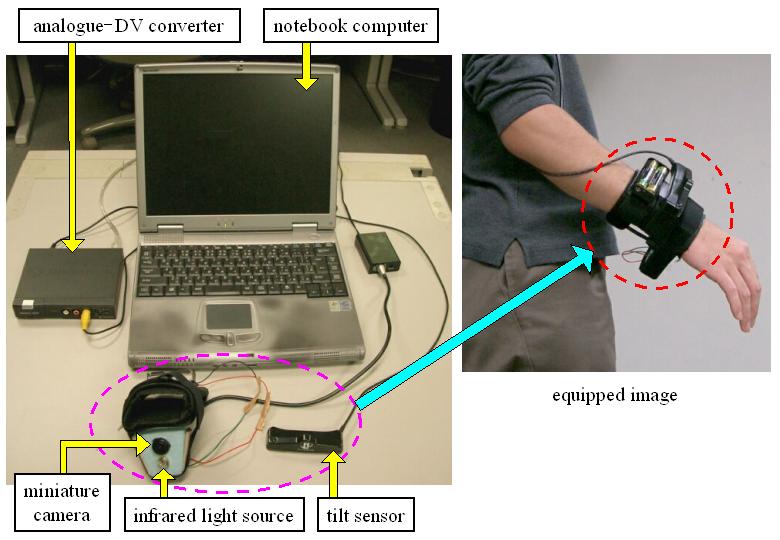
We made a prototype system of AirGrabber. The system consists of some parts below indicates. A notebook computer (CPU: Pentium Celeron 1GHz, Memory: 256MB, OS: WindowsXP) controls the miniature camera and the tilt sensor. The size of captured image is 180*120. A rate of system operation is 7 to 10 fps.
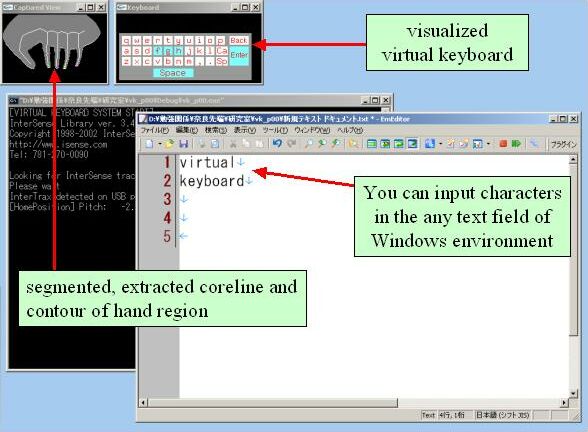
Below is a screenshot. We can input characters in the any text field of Windows environment.
|
| 4. Evaluation experiments and result |
|
We conducted the following three experiments. We got 10 trial subjects to use the prototype system of AirGrabber.
These experimental results show that users could understand the fundamental operation method of AirGrabber easily and they could input characters using the trial production system. Therefore we could receive confirmation that AirGrabber has enough ability to input characters in the environment of Wearable Computer. |
| 5. Summary |
|
We have proposed and made AirGrabber system that enables us to input characters by moving fingers like typing an existing keyboard in the air, and implemented and conducted experiments to show the effective performance in terms of actual typing situations. |